Why:
After speaking with many penetration testers I have realized that web application hacking is a mystery for many testers who typically perform network based penetration testing but have no prior development knowledge. This post is the first in a series of Web Hacking Video Training posts that will attempt to show various techniques that prove useful in situations where you realize all avenues of attack are running across http based protocols. This is typical on external tests. 
Saturday, May 7, 2011

Sunday, April 24, 2011
Immunity Canvas Code and CMDLine Walkthrough
This weekend was my first time playing around with Immunity Canvas. I noticed a lack of documentation for anything Non-Gui based regarding the framework. Since i had such a hard time tracking down information I decided to make a video showing Canvas basic CMDLine usage and tried to explain some module code based on my initial analysis I hope it helps
Wednesday, April 6, 2011
DbPillage Release 0.3
Database Pillager Release 0.3
(Couple New features and updates)
Quick announcement on the Database Pillager tool. I have added in new features and updated many things... Below is some info and an example.
Updates/Features:
-Grabs database password hashes from each database type when -# or --hashes is used
-Implemented Hipaa Searches for all kinds of data (just searched the web for regexes :) haha if you have more I will be happy to add them)
* SSN
SSN with Dashes
SSN with spaces
ICD10
Carefirst ID
dental Procedure
ICD9/ICD9CMType1
ICD9/ICD9CMType2
(Couple New features and updates)
Quick announcement on the Database Pillager tool. I have added in new features and updated many things... Below is some info and an example.
Updated Download Link: (0.6)
http://consolecowboys.org/pillager/pillage_0.6.zip -Grabs database password hashes from each database type when -# or --hashes is used
-Implemented Hipaa Searches for all kinds of data (just searched the web for regexes :) haha if you have more I will be happy to add them)
* SSN
SSN with Dashes
SSN with spaces
ICD10
Carefirst ID
dental Procedure
ICD9/ICD9CMType1
ICD9/ICD9CMType2
Monday, March 28, 2011
The Database Pillager (tool release)
The Database Pillager
(Usage Tutorial, Tool Release 0.1)
(Usage Tutorial, Tool Release 0.1)
I coded up a Database Pillaging tool for multiple database types which can be downloaded below I would host this tool on some kind of code hosting site but they all seem to be a pain in my ass so it will stay in zip format until I find one that isn't a pain to use or doesn't just display all of my personal data.
UPDATED DOWNLOAD LINK v0.6: Also updated post for new syntax added new features since htis post but updated the syntax on this post )
http://consolecowboys.org/pillager/pillage_0.6.zip
http://consolecowboys.org/pillager/pillage_0.6.zip
Why?
Since I have yet to find a post exploitation database tool that works well for me, I coded my own. This project was created to solve a reoccurring problem I have had searching and retrieving PCI/HIPPA data after I have compromised the domain or obtained local database credentials and I still need to prove that I have access to sensitive data. I have found this tool useful for many reasons including finding session tokens, passwords and creditcards in databases. The Database Pillager (DBPillage) was created to fulfill the following goals and is still in active development by myself and other contributors.
Friday, February 4, 2011
OpenDLP Pass-The-Hash
OpenDLP is a great time saving tool when looking for sensitive data on windows machines but one pain with using it is that it requires a username and password for the target machine. Passwords are not always a luxury provided when conducting a pentest, but password hashes are usually plentiful in a windows environment and time crack passwords is not always feasible. The details of obtaining windows password hashes is out of scope for this guide and it will be assumed the reader is familiar with "passing the hash". This guide also assumes that you have already patched your systems samba install to allow for "passing the hash" and have also patched "winexe" - further information about this can be found at the following page:
http://www.foofus.net/~jmk/passhash.html
With that out of the way.....
The OpenDLP database will need to be modified in order to hold our hash. If you already have OpenDLP installed or you are creating a new install you will need to run the following command after the database has been setup -
The provided patch is targeted for OpenDLP 0.2.5 - I cannot promise that it will work against any other version -
OpenDLP - http://code.google.com/p/opendlp/downloads/detail?name=OpenDLP-0.2.5.tar.bz2&can=2&q=
PTH-Patch - pth_mod.patch
If you are patching a new install move "pth_mod.patch" into the OpenDLP directory (OpenDLP-0.2.5) and apply -
If you are patching an existing install (OpenDLP-0.2.5) move the "pth_mod.patch" into the directory where OpenDLP is installed (default is - /var/www/localhost/OpenDLP/ ) and apply -
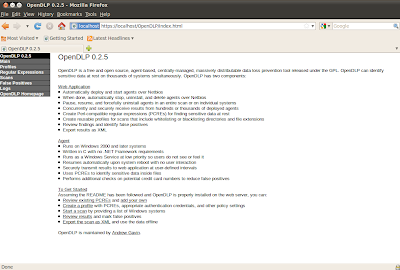
Confirm that your OpenDLP install is still working by accessing the application.
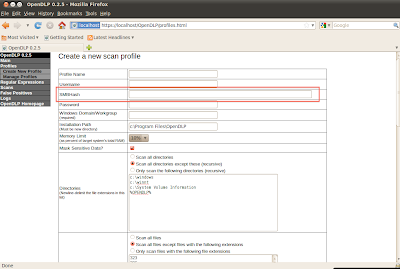
Create a new profile, as you can see "SMBHash" is now an available option -
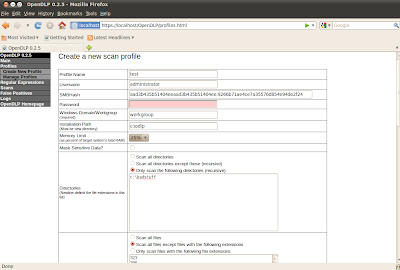
Enter in your information, as you can see in my example I have entered in a hash but no password -
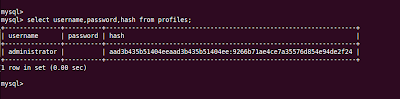
Just to show here is the database entry for this profile -
Create a new scan using our new profile -
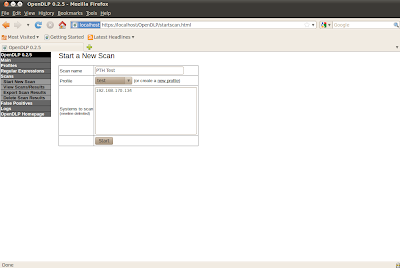
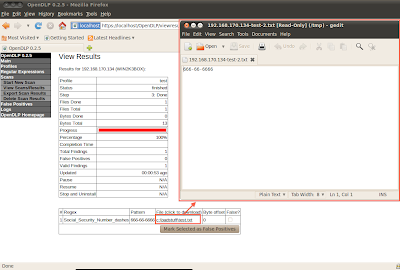
View the scan results, in the following screen shot I have clicked on the flagged file and opened it in gedit -
http://www.foofus.net/~jmk/passhash.html
With that out of the way.....
The OpenDLP database will need to be modified in order to hold our hash. If you already have OpenDLP installed or you are creating a new install you will need to run the following command after the database has been setup -
alter table profiles add column hash varchar(65);Patching OpenDLP -
The provided patch is targeted for OpenDLP 0.2.5 - I cannot promise that it will work against any other version -
OpenDLP - http://code.google.com/p/opendlp/downloads/detail?name=OpenDLP-0.2.5.tar.bz2&can=2&q=
PTH-Patch - pth_mod.patch
If you are patching a new install move "pth_mod.patch" into the OpenDLP directory (OpenDLP-0.2.5) and apply -
tar -xjf OpenDLP-0.2.5.tar.bz2
mv pth_mod.patch OpenDLP-0.2.5
cd OpenDLP-0.2.5
patch -p1 -i pth_mod.patch
patching file OpenDLP/web/bin/control.html
patching file OpenDLP/web/bin/download_file.html
patching file OpenDLP/web/bin/profiles.html
patching file OpenDLP/web/bin/profiles-new.html
patching file OpenDLP/web/bin/results/results.html
patching file OpenDLP/web/bin/start-verify.html
If you are patching an existing install (OpenDLP-0.2.5) move the "pth_mod.patch" into the directory where OpenDLP is installed (default is - /var/www/localhost/OpenDLP/ ) and apply -
mv pth_mod.patch /var/www/localhost/OpenDLP/
patch -p2 -i pth_mod.patch
patching file web/bin/control.html
patching file web/bin/download_file.html
patching file web/bin/profiles.html
patching file web/bin/profiles-new.html
patching file web/bin/results/results.html
patching file web/bin/start-verify.html
Confirm that your OpenDLP install is still working by accessing the application.


Enter in your information, as you can see in my example I have entered in a hash but no password -

Just to show here is the database entry for this profile -

Create a new scan using our new profile -

View the scan results, in the following screen shot I have clicked on the flagged file and opened it in gedit -

Tuesday, January 18, 2011
WPA JTR/Pyrit/cowpatty uses and cracking interoperability
Below is a bunch of ways to inter-operate between pyrit/cowpatty/jtr with various attacking and exporting techniques. I recently figured these out while having to juggle all kinds of cracking issues. A few weeks ago I was performing a wireless pentest and came up across a rather standard WPA PSK network. However, this came with issues that spawned into learning a bunch of new command line usages for various tools in conjunction with one another.
Wednesday, January 5, 2011
Setting up Pyrit on OSX with CUDA Support
A quick guide on getting pyrit installed and working on OSX with gpu (CUDA) support.
First you need to download and install CUDA drivers and CUDA SDK from nvidia.
Drivers -
http://www.nvidia.com/object/macosx-cuda-3.2.17-driver.html
CUDA SDK -
http://www.nvidia.com/object/thankyou.html?url=/compute/cuda/3_2_prod/toolkit/cudatoolkit_3.2.17_macos.pkg
Next you need to install Scapy
Scapy requires a couple libraries to be installed first - pylibpcap and libdnet.
Download and install libdnet and its python bindings
http://libdnet.googlecode.com/files/libdnet-1.12.tgz
Download and install pylibpcap
http://dfn.dl.sourceforge.net/sourceforge/pylibpcap/pylibpcap-0.6.2.tar.gz
Download and install scapy
http://www.secdev.org/projects/scapy/files/scapy-latest.tar.gz
Now that all the pre-reqs are installed we can now build and install Pyrit.
Download the latest pyrit from svn -
Build and install pyrit -
Build and install pyrit-cuda -
Now that Pyrit is installed verify that cuda support is working -
First you need to download and install CUDA drivers and CUDA SDK from nvidia.
Drivers -
http://www.nvidia.com/object/macosx-cuda-3.2.17-driver.html
CUDA SDK -
http://www.nvidia.com/object/thankyou.html?url=/compute/cuda/3_2_prod/toolkit/cudatoolkit_3.2.17_macos.pkg
Next you need to install Scapy
Scapy requires a couple libraries to be installed first - pylibpcap and libdnet.
Download and install libdnet and its python bindings
http://libdnet.googlecode.com/files/libdnet-1.12.tgz
tar -xzf libdnet-1.12.tgz
cd libdnet-1.12
./configure
make
sudo make install
cd python
sudo python setup.py install
Download and install pylibpcap
http://dfn.dl.sourceforge.net/sourceforge/pylibpcap/pylibpcap-0.6.2.tar.gz
tar -xzf pylibpcap-0.6.2.tar.gz
cd pylibpcap-0.6.2
sudo python setup.py install
Download and install scapy
http://www.secdev.org/projects/scapy/files/scapy-latest.tar.gz
tar -xzf scapy-latest.tar.gz
cd scapy-latest
sudo python setup.py install
Now that all the pre-reqs are installed we can now build and install Pyrit.
Download the latest pyrit from svn -
svn checkout http://pyrit.googlecode.com/svn/trunk/ pyrit-read-only
Build and install pyrit -
cd pyrit-read-only
cd pyrit
sudo python setup.py install
Build and install pyrit-cuda -
cd pyrit-read-only
cd cpyrit_cuda
sudo LDFLAGS=-L/usr/local/cuda/lib python setup.py install
Now that Pyrit is installed verify that cuda support is working -
pyrit list_cores
Pyrit 0.4.0-dev (svn r288) (C) 2008-2010 Lukas Lueg http://pyrit.googlecode.com
This code is distributed under the GNU General Public License v3+
The following cores seem available...
#1: 'CUDA-Device #1 'GeForce GT 330M''
#2: 'CPU-Core (SSE2)'
#3: 'CPU-Core (SSE2)'
#4: 'CPU-Core (SSE2)'
#5: 'Network-Clients'
Subscribe to:
Posts (Atom)
Bypassing Alarm Systems - Alarm System Labs CTF Walkthrough
Walking through bypassing physical alarm systems and re-wiring them via free online labs you can follow along and get practice with. Enj...

-
 "Swan song" is a metaphorical phrase for a final gesture, effort, or performance given just before death or retirement. This post ...
 -
 Firstly this post requires the following song to be playing. http://www.youtube.com/watch?v=wVfjwIyc-CU Now that we got that out of...
 -
 A bit over a month ago I had the chance to play with a Dell KACE K1000 appliance ("http://www.kace.com/products/systems-management-app...